Projects
A project is a shared workspace where you and your teammates work together with the AI.
Everything inside a project is shared: the conversations, the uploaded files, and the facts the AI remembers. So when a colleague joins the project, they see the same context you do — nobody has to re-explain the work.
Where to find Projects
Click Projects in the left sidebar. You will see all the projects you belong to, plus a New project button, a Search projects... box, and an Archived button that switches the list to your archived projects.
By default everyone has the Projects item in the sidebar, except people whose role is Restricted. Depending on your role it sits directly in the list or inside the WorkSpace group.
Projects vs. a regular chat
| Regular chat | Project |
|---|---|
| Private to you | Shared with everyone in the project |
| Each conversation stands on its own | The project keeps shared memory, files, and instructions |
| Good for quick, one-off questions | Good for ongoing work and team collaboration |
| No shared files | Files uploaded to the project are available to all members |
What's inside a project
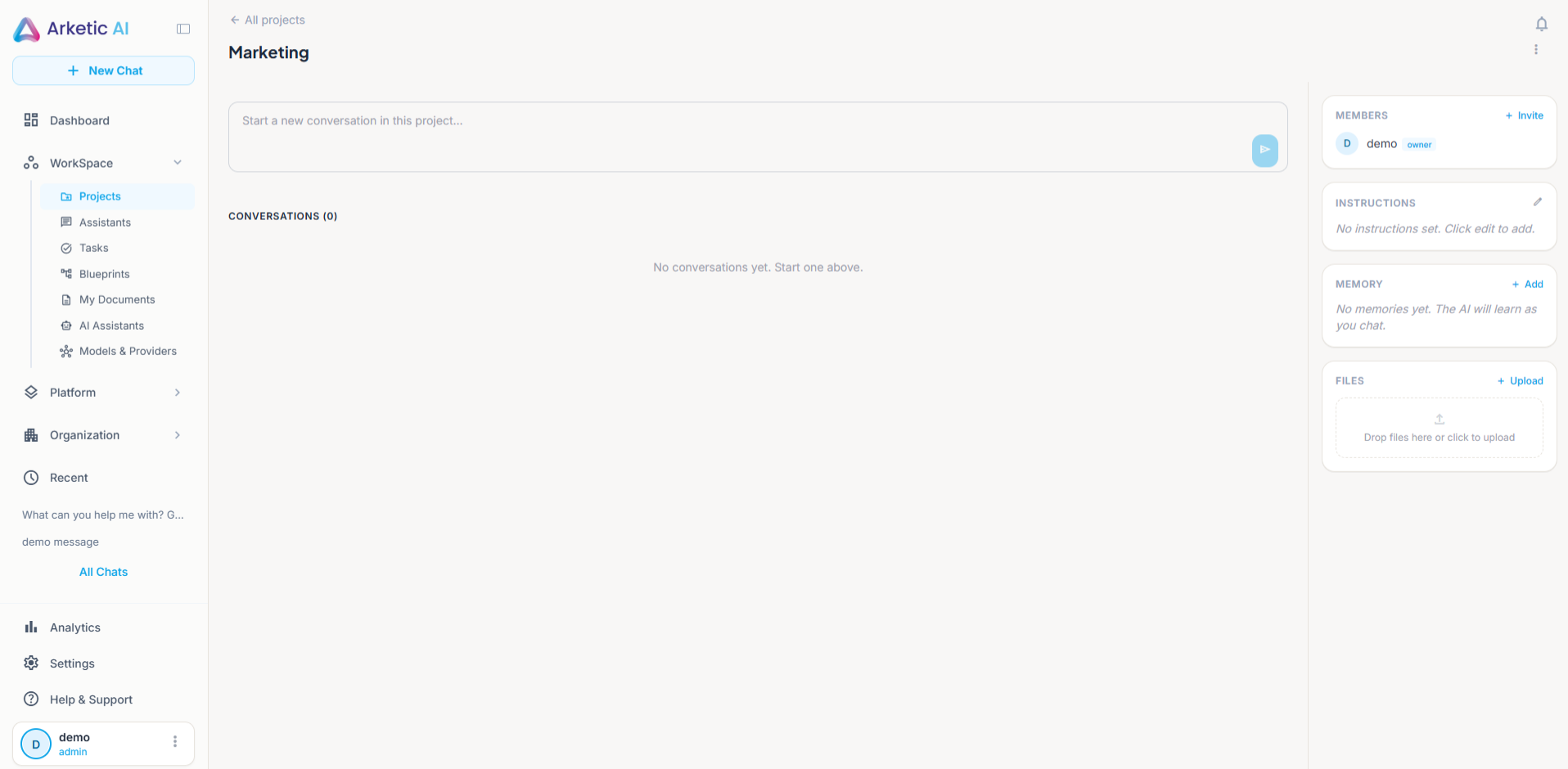
When you open a project, you get a workspace made of five parts.
| Part | What it is |
|---|---|
| Conversations | AI chats that belong to the project. Anyone in the project can read them and start new ones. |
| Members | The people who have access to the project. The creator carries an Owner badge. |
| Instructions | Guidance you write once for the AI to follow in every conversation in this project. |
| Memory | Important facts about the project. Some are learned by the AI as you chat, some you add yourself. |
| Files | Documents, spreadsheets, presentations, and images uploaded for this project. |
The project screen is split in two. On the left is a box that says Start a new conversation in this project..., and under it the Conversations list. On the right you'll find the Members, Instructions, Memory, and Files panels.
An All projects link at the top takes you back to the project list.
The right-hand panels are hidden on small screens. Use a wider screen or a desktop browser when you want to manage members, instructions, memory, or files.
Who can create a project
By default every Member, Executive, and Admin can: open Projects, click New project, and the project is yours. Creating projects is a permission, so if your organization has taken it out of your role, the New project button isn't shown.
The person who creates a project automatically becomes its Owner. Everyone the owner adds afterwards is a Member. Those are the only two levels inside a project.
| Role in the project | Who they are | What they can do |
|---|---|---|
| Owner | The person who created the project | Everything a member can do, plus: invite members, edit the project's name and description, edit the project instructions, and archive or restore the project |
| Member | Anyone the owner adds | Open the project, read and start conversations, upload and remove files, and add, edit, or delete memory facts |
A project's owner is simply whoever created that project — it isn't a role in the company account. There is one exception: a project member whose system role is Admin or Executive can manage that project the same way its owner can.
Each of these actions — creating a project, inviting, editing the name, description and instructions, archiving, and adding, editing or deleting memory — also depends on a permission. The standard roles include them, so most people never notice. If your organization uses custom roles, a control you aren't allowed to use is simply not shown.
For the full breakdown of what each side can do, see Project members.
Project Memory
Memory is what makes a project feel like it already knows your work.
As you chat inside a project, the AI picks up important facts and stores them. Those show up marked as AI-learned. You can also write facts yourself — those are marked Manually added.
By default any member can add, edit, or delete a memory fact, so the team can keep it accurate together. When you add a fact, you choose what kind it is: fact, decision, preference, technical, deadline, or contact.
Before you have any, the Memory panel says No memories yet. The AI will learn as you chat.
If the AI has remembered something incorrectly, or has missed something that matters, edit the fact or add your own. Everyone in the project benefits immediately.
Instructions
Every project has an Instructions field where the owner writes how the AI should behave for this work — the tone to use, what to focus on, what to avoid.
Members can read the instructions, but only the owner — or a member whose system role is Admin or Executive — can change them. Until something is written, the panel shows No instructions set. Click edit to add.
Files
Upload the documents your team keeps referring to, and they stay with the project instead of being re-attached to every chat.
Any member can upload files and any member can remove them. You can drop several files onto the Drop files here or click to upload area at once, or use the Upload link to pick them from your computer.
Supported formats include PDF, Word (.doc, .docx), Excel (.xls, .xlsx), PowerPoint (.ppt, .pptx), plain text (.txt), CSV, Markdown (.md), and images (PNG, JPG, GIF, WebP).
Archived projects
A finished project can be archived instead of staying in your list. Click Archived on the Projects page to see the projects that were archived; each card there has a Restore button that brings the project back, with its conversations, files, and memory. See Creating projects.
Starting from an empty Projects page
If you haven't created or been added to any project yet, the Projects page shows No projects yet with the line Create your first project to organize your work and a Create your first project button. Click it to open the same form as New project.